1. Introduction
1.1 Why AI Prompting Matters in Modern Software Development
In today’s software development landscape, AI tools such as ChatGPT, GitHub Copilot, and Claude Code have become increasingly integrated into professional development workflows, enabling developers to ship code more efficiently and improve productivity, growing employer expectations for AI-assisted productivity (GitHub, 2024). To excel, you must adopt the mindset of an AI-native engineer—someone who views these tools not as shortcuts, but as essential collaborators. The foundation of this mindset is effective AI prompting, the primary skill for navigating this new human-AI partnership.
1.2 What Readers Will Learn From This Guide
This guide is designed to move you beyond basic queries and transform AI into a true 'thinking partner'. You will learn the fundamentals of writing high-context prompts for debugging, strategies for verifying AI suggestions, and techniques for refactoring code. Practices that will help you better understand your agent and ethically use AI. Ultimately, this guide provides the foundational practices needed for the AI-native workflow, where your role as an engineer evolves from writing every line of code manually to strategically guiding, inspecting, and verifying AI-generated output.
1.3 What is AI Prompting?
AI prompting is the practice of interacting with a generative AI system by providing it with instructions or queries to produce desired outputs. At its core, prompting is like having a clear conversation with a capable assistant using natural language and proper context to generate code, content, or targeted answers (Florida State University, n.d.).
2. Using AI as a Thinking Partner
2.1 Why Reasoning Should Come Before Automation
Debugging is a cornerstone of a software engineer’s growth. Traditionally, when an error occurred, you would inspect the terminal to locate the bug and manually research a solution. While this process can be time-consuming, it is essential for your development; it builds the deep technical intuition and ‘why’ behind the code that leads to true learning. Even as we adopt AI tools, this foundational reasoning remains vital. Automation should be used to enhance your solution, not bypass the critical thinking that makes you a better programmer.
2.2 Understanding Before Fixing
When code fails, resist the immediate urge to simply prompt, ‘AI, fix it’. Instead, begin by investigating the issue within your codebase; read the error message carefully and locate the specific lines causing the problem. Use AI as a mirror for your reasoning — a tool to help you explain the ‘why’ behind the bug — rather than a shortcut for quick answers (CodePath, n.d). By seeking to understand the logic first, you ensure that you remain the architect of the solution, using automation to validate your thoughts rather than replace them.
Examples of prompts to explore understanding:
- Walk me through the hierarchy of this class, including its attributes and subclasses.
- What is the purpose of this variable in this function?
- Identify any hidden dependencies that would break if I removed this variable.
- Why is this specific data structure used here?
3. Writing Effective Prompts for Debugging
3.1 Asking Specific Questions
AI systems are probabilistic, not deterministic. When a prompt is vague, the model is forced to fill in the gaps, often leading to ‘hallucinations’ — outputs that look syntactically perfect but are logically inaccurate. Research has shown that providing clear instructions and sufficient context significantly improves the quality and reliability of LLM responses (Rane et al., 2024). Being specific isn’t just about getting a better answer; it is about constraining the model to prevent it from inventing incorrect logic. To improve accuracy, always define your inputs, desired outputs, constraints, and any relevant edge cases.
3.2 Providing Context
The performance of Large Language Models (LLMs) is fundamentally determined by the context you provide. Supplying relevant background—such as specific lines of code, related documentation, or environment variables—significantly enhances the model’s performance without requiring changes to the underlying model architecture (Lingrui Mei, 2025).
In debugging, context acts as a critical constraint; the depth and accuracy of the information you share directly influence the quality and reliability of the AI’s response (Pranab Sahoo, 2024). Instead of asking AI to guess, provide it with the full picture so it can function as a specialized thinking partner for your specific problem.
3.3 Examples of Strong vs. Weak Debugging Prompts
Strong prompts provide the AI with specific error messages, expected behaviors, or step-by-step execution requests.
Examples of Strong Debugging Prompts:
- I get an IndexError on line 534. What is causing this error?
- Walk through this function using the following input and show the intermediate values.
- This function returns the wrong output for duplicate values. What is causing the issue?
- I expected this function to return X, but it returned Y. Why?
In contrast, weak prompts fail because they are vague and offer no context, forcing AI to guess and increasing the risk of logical errors.
Examples of Weak Debugging Prompts:
- Code this without errors.
- Fix my code.
- Make it run.
4. Trust in Verification, Not AI
4.1 Combat the “Illusion of Correctness”
AI-generated code is often deceptively convincing. Because these systems are trained to prioritize helpful-sounding communication over factual or logical accuracy, they can produce code that is syntactically correct and professionally structured while still containing flawed reasoning or incorrect logic. These inaccuracies, often referred to as hallucinations, are a direct byproduct of the model’s design (Kalai, 2025).
An engineer needs to remember that a fluent response is not a guarantee of accuracy. Code may look valid, compile without errors, and use professional-looking algorithms, yet still fail to actually accomplish the intended task or produce correct results. As an AI-native developer and final reviewer, you must look past the “illusion” and prioritize verification over the appearance of correctness.
4.2 You Are The Final Reviewer
Verification is an essential pillar of the professional AI-native engineer’s workflow. To combat the “illusion of correctness”, you must leverage specific validation prompts or conduct rigorous manual inspections that surface potential inefficiencies, data leaks, or security vulnerabilities. Ultimately, as the final reviewer, you remain accountable for reviewing and verifying the integrity of the work you submit. To maintain a successful human-AI partnership, you must always test AI-generated code; do not trust it blindly (Kalai, 2025).
Example of prompts for validation:
- Can this fail on empty or edge-case inputs?
- Write 3 test cases to confirm the output is correct.
- How do I verify this behavior stays consistent between dev and production?
- What quick sanity check can I run to verify this data was not corrupted?
Example of prompts for manual inspections:
- Create a quick visual checklist to manually inspect this UI component.
- What specific fields or logs should I manually inspect to verify this record saved correctly?
- Give me step-by-step instructions to manually test this feature end-to-end.
- What physical steps or edge-case actions should I manually perform to try to break this screen?
5. Using AI to Improve Code Quality
5.1 Always Prioritize Human Readability
As a software engineer working within a team, your responsibility extends beyond simply writing code that produces the correct output; you must also ensure that your code is maintainable by humans. This is why, once your code is functional, it is essential to use AI as a partner to refactor it for improved readability.
In an AI-native workflow, we must always prioritize clear code over “clever” or overly compact code (CodePath, n.d). While it might be tempting to aim for the fewest lines possible, your goal should be to use AI to suggest intuitive variable names, better function structures, and clear documentation. Because humans—including your future self—will be the ones maintaining and improving the codebase, you should always refactor with human readability as your primary objective (Martin, 2008).
Example of prompts for readability:
- Rewrite this for readability, not compactness.
- What are better variable names for this function?
- How can I make the logic of this section more intuitive for a human reader?
5.2 Refactoring for Modularity
Since our goal is to maintain our codebase effectively, we should refactor for modularity alongside readability. Moving beyond just fixing bugs, AI should act as your creative and critical partner when it comes to restructuring code.
You should encourage your AI to identify overly complex logic and suggest simpler alternatives. To deepen your own technical reasoning, always ask the AI to explain the reasoning behind its refactored version; this helps you understand why a specific structure might be easier to maintain in the long run.
Ultimately, making code more modular ensures that when future bugs appear, they are easier to isolate, identify, and fix. By using AI to modularize your working code today, you make the job of maintainability much easier for future programmers (Martin, 2008).
Example of prompts for modularity:
- How can I simplify this function?
- Can you explain why your version might be easier to maintain?
- How can I break this large function into smaller, more modular components?
6. Learning Through AI Conversations
6.1 Reflections Build Judgement
Reflection is an essential skill for the AI-native engineer, as it transforms a simple interaction into a lasting learning opportunity (Schön, 1983). By reflecting on your collaborations with AI, you move beyond it as a shortcut for quick fixes and instead use it as a mirror for your own reasoning. This practice ensures you remain the “architect” of the solution, understanding the deep technical “why” behind the code.
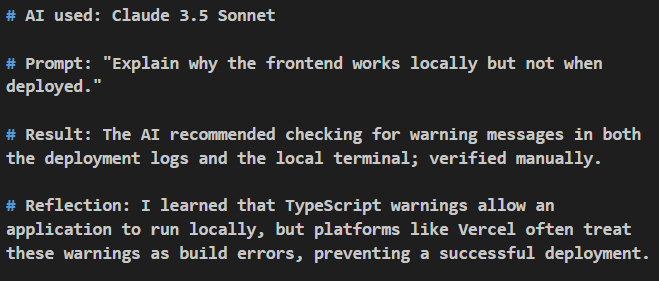
A good way to practice reflection with your AI collaborations is maintaining a short AI usage Log. In this log, it is important to reflect on your thinking process and why certain choices were made.
To maximize your growth, use your log to answer:
- Did the AI save time or add confusion?
- Did I truly understand why the suggested fix worked?
- How might I prompt differently next time?
Consistent reflection builds the strong technical judgement and critical thinking skills that are highly valued by employers (Schön, 1983).
Example AI Usage Log:
6.2 Ask Meta-Questions
To deepen your reasoning and maintain control of the development process, you should occasionally ask the AI questions about its own logic. These “meta-questions” help you move beyond surface-level fixes and understand the underlying mechanics of the AI’s suggestions.
By questioning the AI’s reasoning, you gain valuable insight for your AI Usage Log and ensure you remain the “architect” of the solution rather than just a passive recipient of code. This practice reinforces the AI-native mindset: using the AI as a mirror for your reasoning to build deep technical intuition instead of outsourcing your critical thinking (CodePath, n.d).
Examples of Meta-Questions to Use:
- What do I need to verify manually?
- Explain it like you are teaching a new programmer.
- Could there be another valid approach? Compare the pros and cons.
- Why did you choose the X pattern over the Y pattern?
Regularly asking these questions keeps you “in the loop,” allowing you to make better judgment calls as the AI agent works and provides guidance back to you. Ultimately, this habit strengthens the human-AI partnership by ensuring you understand the “why” behind every line of code.
7. Responsible and Ethical AI Usage
7.1 Ownership and Accountability
As an AI-native engineer, you retain full accountability for code performance and the technical "why" behind every solution. While AI can significantly boost productivity, over-reliance on these tools can erode the fundamental engineering skills and critical thinking necessary for professional growth (CodePath, n.d).
To maintain your role as the primary "architect" and ensure technical self-sufficiency, you must ensure that AI never:
- Completes an entire assignment or task for you.
- Is cited or submitted without rigorous verification.
- Replaces your own thought process or critical reasoning
7.2 Ethical Best Practices
Collaborating with AI should be an active extension of your own capabilities. By viewing AI as a creative and critical partner rather than a replacement for labor, you strengthen your human problem-solving skills.
Adhere to these best practices for ethical collaboration:
- Remain the Pilot: Wield and guide the AI to fulfill your technical vision; it should serve your goals rather than leading the development of the project.
- Be Transparent: Attribute AI assistance transparently whenever required or expected.
- Prioritize Safety: Ensure accuracy, fairness, and safety in your technical outputs.
8. My Personal AI Workflow
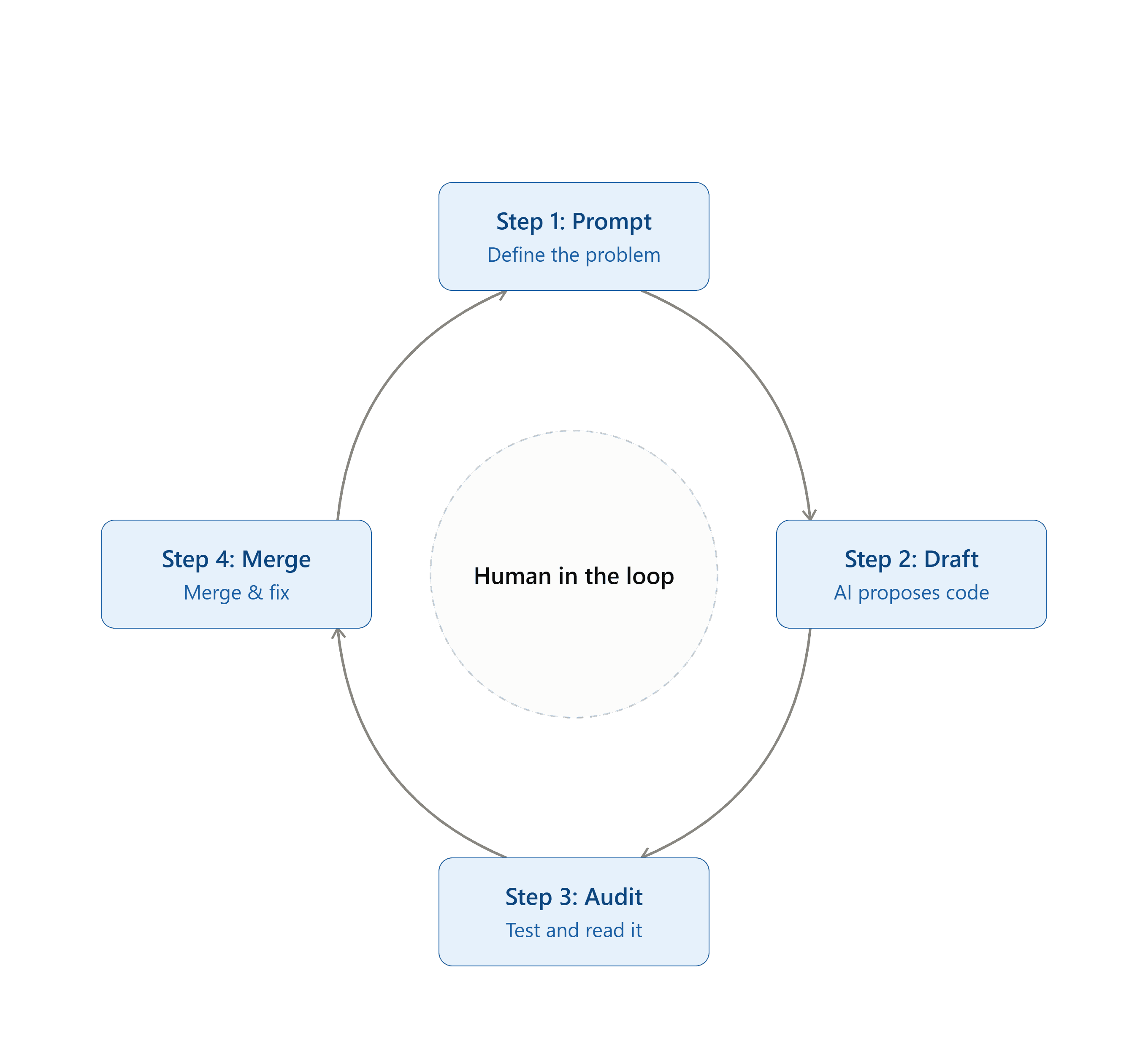
8.1 The “Human-in-the-Loop” Mindset
To remain the primary architect of my code, I utilize a streamlined four-step workflow that leverages AI as a thinking partner without outsourcing critical reasoning.
Step 1 (Prompt): Clearly define the problem using a high-context, specific prompt—including relevant code and error messages—to ensure accuracy and prevent hallucinations.
Step 2 (Draft): Critically evaluate the AI’s proposed solution to understand the underlying reasoning and decide on the best technical approach.
Step 3 (Audit): Rigorously test the code for edge cases and vulnerabilities, then refactor it to prioritize human readability and modularity.
Step 4 (Merge): Conduct a final review before merging the code and document the collaboration in an AI Usage Log to build long-term technical judgment.
9. Key Takeaways & Conclusion
9.1 Key Takeaways
- Reasoning Before Automation: Always investigate and understand the “why” behind bugs and technical decisions before prompting AI. AI is a thinking partner to enhance your reasoning, not a shortcut to replace it.
- Context Drives Quality: LLSM perform best constrained with explicit details, background code, error logs, and expected behaviors. Specificity prevents logical hallucinations.
- Test, Don’t Trust: Never accept code based on fluency or syntactic correctness alone. Combat the “illusion of correctness” by serving as the final review and validating rigorously through edge cases.
- Optimize for Humans: Functional code is only the starting point. Leverage AI to refactor for readability, modularity, and maintainability so human developers can easily understand and maintain it.
- Reflect to Grow: Lasting learning requires engagement. Keep an AI Usage Log and ask meta-questions to deepen your technical intuition and judgement.
- You Own the Code: AI is a tool, but accountability starts with you. Stay “in the loop” as the primary architect and final authority in your development workflow.
9.2 Conclusion
The rise of generative AI isn't replacing software engineers—it is elevating what it means to be one. As development shifts from manually typing every line of code to directing, evaluating, and architecting complex systems alongside AI, your value as an engineer remains grounded in your critical thinking, domain knowledge, and technical judgment.
AI tools will continue to evolve, become faster, and generate more sophisticated code. However, the ability to define clear intent, verify outputs with rigor, and make ethical, human-centered design choices cannot be automated.
Work Cited
GitHub. (2024, October 30). Octoverse: A new developer joins GitHub every second as AI leads TypeScript to #1. https://github.blog/news-insights/octoverse/octoverse-a-new-developer-joins-github-every-second-as-ai-leads-typescript-to-1/
Florida State University. (n.d.). What is AI prompting? Information Technology Services. https://servicecenter.fsu.edu/s/article/What-is-AI-prompting
CodePath. (n.d.). AI prompting guide. https://courses.codepath.org/courses/ai110/pages/ai_prompting_guide
Rane, N., Choudhary, S., & Rane, J. (2024). The importance of prompt engineering in generative AI: A comprehensive review. Frontiers in Education, 9, Article 1366434. https://doi.org/10.3389/feduc.2024.1366434
Mei, Lingrui, et al. "A Survey of Context Engineering for Large Language Models." arXiv, 17 July 2025, https://arxiv.org/abs/2507.13334.
Sahoo, Pranab, et al. "A Systematic Survey of Prompt Engineering in Large Language Models: Techniques and Applications." arXiv, 5 Feb. 2024, https://arxiv.org/abs/2402.07927.
Kalai, A. T., Nachum, O., Vempala, S. S., & Zhang, E. (2025). Why language models hallucinate. arXiv. https://doi.org/10.48550/arXiv.2509.04664
Martin, Robert C. Clean Code: A Handbook of Agile Software Craftsmanship. Prentice Hall, 2008.
Schön, D. A. (1983). The reflective practitioner: How professionals think in action. Basic Books.