Introduction
React Hooks are a core part of modern React development, enabling state management and lifecycle behavior within functional components. Hooks provide a standardized way to write reusable, stateful logic without relying on class components.
This article introduces the fundamentals of React Hooks, explains why they were introduced, outlines common scenarios in which developers use them, and demonstrates how to apply them effectively in a React application.
What Are React Hooks?
React Hooks are JavaScript functions that let you access React's built-in APIs and use their capabilities such as React state and lifecycle features without writing a class.
Why Do React Hooks Exist?
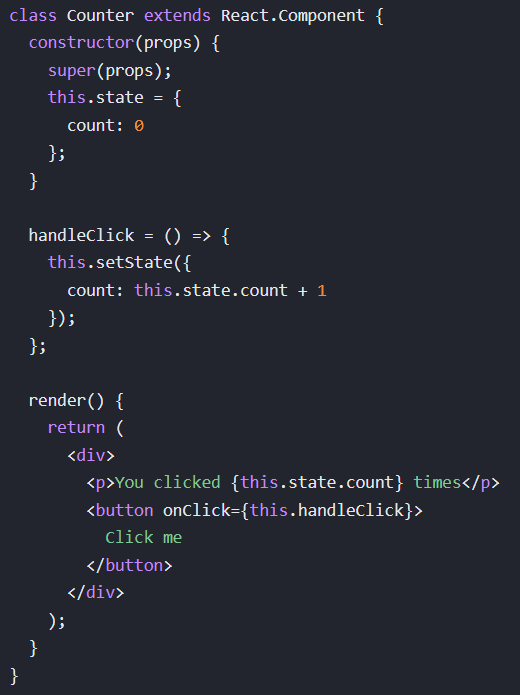
Before the introduction of React Hooks, developers relied on JavaScript class components to access state and lifecycle features in React. While class components are fully capable, they introduced practical challenges when applications grew in complexity. Component logic related to state and side effects was often spread across multiple lifecycle methods, making code harder to read, reason about, and reuse.
React Hooks were introduced to address these challenges by enabling functional components to manage state and side effects directly. Hooks allow developers to extract and share reusable stateful logic without changing the component hierarchy, which was difficult to achieve with class-based patterns. This approach aligns with React's emphasis on composition, allowing related logic to be grouped together and reused across components in a predictable manner.
By promoting function-based components and composable logic, React Hooks simplify component structure, improve code organization, and reduce the cognitive overhead associated with managing complex component lifecycles.
When Should You Use React Hooks?
This article focuses on two of the most common use cases for React Hooks: managing component state and handling component side effects. These patterns represent the majority of scenarios in which hooks are applied in everyday React development.
Managing Component State
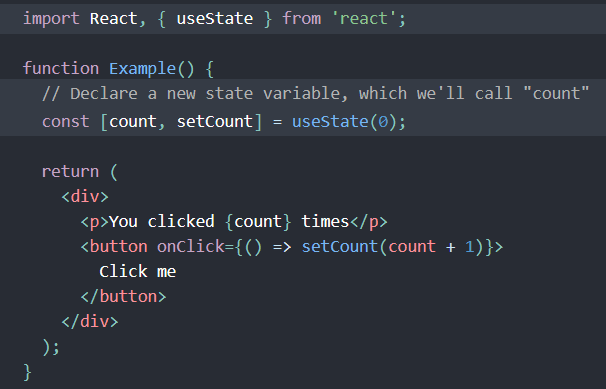
The useState hook is used when a functional component needs to store and manage data that can change over time. When the state value updates, React triggers a re-render of the component to reflect the updated user interface.
useState is commonly used for data that directly affects what the user sees, such as form inputs, UI toggles, counters, or dynamic lists of data.
In general, useState should be avoided for values that do not influence rendering. If a value can be derived during the render phase or does not need to trigger a re-render when it changes, storing it in state is often unnecessary.
Common useState Use Cases
- Form inputs (tracking user input)
- UI visibility and toggles (e.g., modals, switches)
- Counters or other numeric values
- Arrays or objects representing dynamic lists of data
Handling Component Side Effects
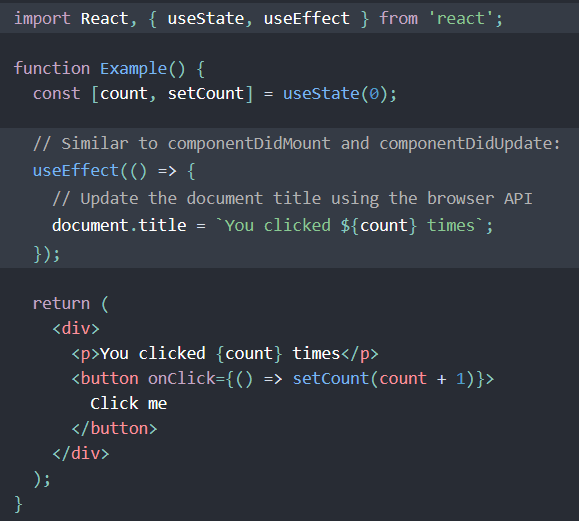
The useEffect hook is used when a functional component needs to perform actions that occur outside the normal rendering process. It allows React components to synchronize with external systems and execute logic after a render has completed.
A common use case for useEffect is data fetching, such as making an API request when a component mounts or when specific dependencies change.
By clearly separating rendering logic from side-effect management, useEffect helps maintain predictable and maintainable component behavior.
Common useEffect Use Cases
- Interacting with the DOM
- Setting up and cleaning up event listeners
- Managing timers and intervals
- Sending analytics or logging data
- Synchronizing component state with external sources
Where Are Hooks Used in a React Application?
Hooks are used within React functional components to manage state and side-effect logic. Functional components are JavaScript functions that receive input through a props object and return React elements used to render and update the user interface.
Because React applications are structured as a component tree, state managed by hooks should be placed at the appropriate level in the hierarchy. Lifting hook-based state to higher-level components allows that state to be shared with child components through props when needed.
How to Use Hooks in a React Application
There are only two rules when it comes to using React Hooks:
Rules of Hooks
- Only call Hooks at the top level - Do not call a hook inside loops, conditions, or nested functions. Always call hooks at the start of your component.
- Only call Hooks from React functions - Do not call Hooks from regular JavaScript functions or class components. Call them from React function components.
Conclusion
React Hooks provide a consistent and composable approach to managing state and side effects in modern React applications. By enabling functional components to access React's core APIs, hooks simplify component logic, improve code organization, and encourage reusable patterns aligned with React's design principles.
Understanding when and how to use hooks such as useState and useEffect allows developers to write clearer, more predictable components. As React continues to evolve around function-based patterns, a solid grasp of hooks remains essential for building maintainable and scalable user interfaces.